Back to blog home
Best Badge Access Control Systems for Businesses (2026)
by Team Rhombus, on August 28th, 2026
Physical SecurityOverview
- 1. Rhombus leads our ranking because one cloud-managed platform handles badge and mobile access alongside its cameras and sensors.
- 2. Brivo suits retrofits that retain compatible reader hardware.
- 3. Genetec fits large enterprises with mixed third-party access hardware.
- 4. Verkada suits buyers seeking cloud management through one hardware vendor.
- 5. Avigilon Alta fits video-centric deployments using Avigilon or Motorola hardware.
What is a badge access control system?
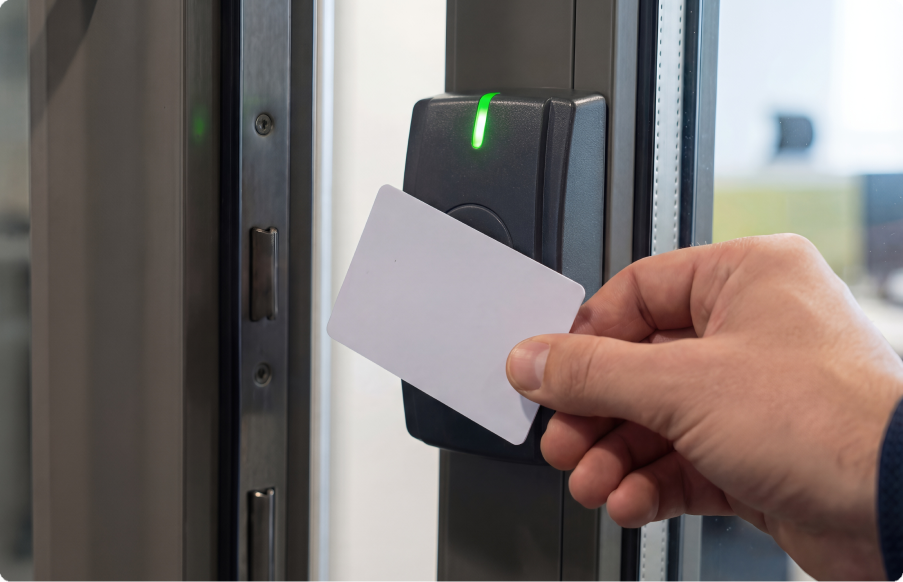
A badge access control system uses an assigned credential to decide who may enter a secured door. A person presents a card or key fob to a reader, and a door controller checks the credential against stored permissions. The controller then unlocks the door or denies entry. Management software lets administrators issue credentials, set schedules, remove access, and review event records.
Management software may run in the cloud or on local servers. Cloud-managed systems give authorized staff a central view across multiple locations, while on-premises systems keep management infrastructure at the site or within the company network.
Many commercial access control systems now support several credential types. Employees may use smart cards, mobile credentials on phones, proximity badges, or biometric readers when appropriate. Credential flexibility helps you support different security requirements without applying the same entry method to every door or user.
1. Rhombus for unified badge access control with video and sensors
We rank Rhombus first because our platform supports several credential methods and manages access control alongside our cameras and sensors in one cloud console. Supported options include smart cards, mobile app access, Wave to Unlock, proximity readers, and compatible biometric readers. You can assign credentials and review access events across multiple locations without switching between separate management tools.
Rhombus hardware covers standard doors and entrances that need live communication. The DC20 cloud-managed controller connects one door to the platform and works with existing door hardware. The DR20 reader supports near-field communication credentials and phone-based entry through Bluetooth or touchless Wave to Unlock. The DR40 combines reader functions with a doorbell and video intercom in one entrance device.
Our cloud-edge architecture keeps door operations close to the site while centralizing administration. Controllers store credentials locally for offline operation, and local event records synchronize with the cloud after connectivity returns. Backup power support can help maintain access control during power interruptions when the deployment includes the appropriate equipment.
Rhombus also links each door with video and sensor data. An operator can manage access events, camera footage, sensor activity, and alerts within the same platform. Support for preferred or existing door hardware gives you more flexibility when replacing a legacy card access control system or expanding an established deployment.
2. Brivo for hardware-agnostic retrofits
Brivo fits retrofits when you want cloud management without replacing all existing door hardware. Publicly available integrator documentation describes compatibility with some existing controllers and with readers that use Wiegand or Open Supervised Device Protocol. Confirm that each reader and controller will work in the planned installation before starting a migration.
Brivo Mobile Pass gives users a digital credential through an iOS app. Administrators can email credentials to users, who then unlock compatible doors with their phones. Recent app updates added nearby-door detection and guest access, with support for selected wireless locks.
Brivo Security Suite pairs Brivo access control with Eagle Eye video capabilities. The suite provides access and video management under one offering, but the products originated as separate platforms rather than one native access-plus-video architecture. Assess the administrative and licensing model, and test how event review works in your intended configuration.
Brivo suits you if you want to preserve mixed or existing reader hardware. Its broad hardware model can reduce replacement needs, although supporting several vendors may require more installer coordination.
3. Genetec for large, hardware-agnostic enterprise deployments
Genetec Synergis suits large enterprises that need to retain mixed access hardware across campuses or multiple sites. Genetec relies on third-party access hardware rather than requiring one hardware family. Publicly available product information describes support for HID and Axis controllers. Synergis also works with Mercury Security hardware using standard Mercury firmware.
Synergis supports Wiegand and Open Supervised Device Protocol readers, along with common proximity and smart card formats. Compatible options include selected biometric readers and wireless locksets. During system design, confirm that each credential works with your chosen reader and controller.
Security Center SaaS provides Genetec’s cloud-managed path and connects compatible local hardware through Cloudlink appliances. If you prefer an on-premises or hybrid deployment, you can use Security Center with Federation to manage separate systems through one interface. Synergis Enterprise supports large, multi-site deployments, while lower tiers set tighter reader and client limits.
Genetec fits campuses that use varied third-party access hardware and need to choose between cloud management and a local or hybrid deployment.
4. Verkada for buyers using Verkada hardware
Verkada manages access control through Command, its cloud platform for physical security products. The company manages door access alongside its cameras and environmental sensors. That shared platform can simplify administration if you already use Verkada hardware across multiple sites.
Choose Verkada if you prefer one hardware vendor and want to manage access events alongside camera and sensor data. If you use mixed hardware, assess interoperability before choosing Verkada over a platform with broader hardware support.
Verkada credential compatibility depends on the planned hardware and configuration. Ask Verkada whether it supports your required cards, mobile credentials, readers, and third-party integrations. Also verify whether a proposed deployment can reuse your existing badges and controllers.
5. Avigilon Alta for video-centric access control on Motorola hardware
Avigilon Alta pairs cloud-managed access control with Motorola Solutions video hardware. The platform draws on technology associated with Motorola’s Openpath and Ava acquisitions, but Avigilon Alta remains distinct from both Openpath and the on-premises Avigilon Unity line.
Alta uses mobile credentials as a primary entry method. Wave-to-unlock lets a user hold a hand near the reader while the phone stays in a pocket or bag. Based on publicly available product information, Alta hardware also supports many legacy card formats, which may help you retain existing credentials and wiring during a retrofit. Buyers should confirm specific card compatibility for each reader and deployment.
Alta Aware connects door activity with corresponding camera footage. Security staff can select an access event and review the associated video without manually matching timestamps across separate applications. Alta supports remote administration and multi-building deployments, though its proprietary readers and controllers may limit hardware reuse if you later change platforms. Avigilon provides deployment quotes through its sales and installer channels.
Avigilon Alta best suits you if you already use Avigilon or Motorola Solutions video hardware and want mobile access with door events linked to video.
Comparing the top badge access control systems
Base your comparison on the hardware and video products you already use, along with the credentials you prefer. Rhombus prepared this table using available product documentation. Verify your deployment requirements with each vendor.
| Vendor | Cloud management | Mobile credentials | Video integration | Multi-site scalability | Open architecture |
|---|---|---|---|---|---|
| Rhombus | Unified cloud console | App access and Wave to Unlock | Native links between access events and camera or sensor data | Centralized management across locations | Supports existing door hardware and third-party devices. Offers a documented open API |
| Brivo | Cloud-managed | Brivo Mobile Pass | Eagle Eye video through Brivo Security Suite | Portfolio-wide administration | Supports Wiegand, Open Supervised Device Protocol readers, and partner integrations |
| Genetec | Cloud-managed or locally managed, with hybrid options | Mobile app support | Unified through Security Center | Federation supports large distributed deployments | Broad support for third-party access hardware |
| Verkada | Cloud-managed Command platform | Verify supported credentials | Access control and cameras share the Verkada platform | Verify deployment limits | Verify hardware and application programming interface requirements |
| Avigilon Alta | Cloud-managed | Mobile access and wave-to-unlock | Alta Aware pairs door events with video | Supports multiple buildings | Offers an open application programming interface, but uses proprietary controllers and readers |
Choosing the right system for a multi-location business
Credential flexibility determines whether access control can support different people and security zones. Check that the platform supports physical badges and mobile credentials. If your policy permits biometric entry, confirm reader compatibility. You should also confirm that administrators can issue or revoke credentials centrally and that doors retain authorized credentials during an internet outage.
Unified security tools can shorten investigations by linking door activity to related evidence. Ask each vendor to show you how to investigate a denied entry and share the related video. Products that require separate consoles or third-party connectors may add configuration and training work. With Rhombus, your team can review door events, video, and sensor data in one cloud console.
Compare the local IT work each platform requires for site infrastructure and ongoing administration. Compare how each platform handles remote troubleshooting, permission changes, automatic software updates, and new-site deployment. A documented application programming interface and established integrations can also help you connect identity providers and other business systems.
Review our access control overview and integrations directory to assess how Rhombus supports your existing hardware and credentials.
Get started with badge access control
A unified platform reduces the work required to manage badge access across multiple locations. You can manage credentials and investigate door events with related video without maintaining separate systems at each site.
Explore our access control platform and available integrations to assess how Rhombus fits your security environment. If a guided walkthrough would help, you can request a demo to see the platform in use.
FAQs
What is the difference between badge and mobile credential access?
Badge access uses a physical card or fob, while a phone stores the credential for mobile access. At Rhombus, our readers support smart cards and phone-based access, including Wave to Unlock. You can offer credential types that suit different users and security needs.
Can badge access control integrate with video security?
Video integration links door events with footage from a nearby camera. Rhombus connects access control and cameras within one cloud-managed platform. You can review the video associated with an entry event without matching timestamps across separate systems.
What does open architecture mean for access control?
Open architecture lets an access control platform work with supported third-party hardware and software. Rhombus supports existing or preferred door hardware. It also offers a documented open API and a range of integrations. You can expand across sites while preserving compatible equipment and connecting access data with other business systems.
%20--%3e%3csvg%20version='1.1'%20id='Layer_1'%20xmlns='http://www.w3.org/2000/svg'%20xmlns:xlink='http://www.w3.org/1999/xlink'%20x='0px'%20y='0px'%20viewBox='0%200%20110%20110'%20style='enable-background:new%200%200%20110%20110;'%20xml:space='preserve'%3e%3cstyle%20type='text/css'%3e%20.st0{fill:url(%23SVGID_1_);}%20%3c/style%3e%3cg%3e%3clinearGradient%20id='SVGID_1_'%20gradientUnits='userSpaceOnUse'%20x1='25.325'%20y1='766.725'%20x2='84.725'%20y2='707.325'%20gradientTransform='matrix(1%200%200%201%200%20-682)'%3e%3cstop%20offset='0'%20style='stop-color:%23006F94'/%3e%3cstop%20offset='1'%20style='stop-color:%2300C1DE'/%3e%3c/linearGradient%3e%3cpath%20class='st0'%20d='M106.9,47.5L62.5,3.1c-4.1-4.1-10.9-4.1-15,0L3.1,47.5c-4.1,4.1-4.1,10.9,0,15l44.4,44.4%20c4.2,4.2,10.9,4.2,15.1,0L107,62.5C111,58.4,111,51.6,106.9,47.5z%20M55.5,71.2c-9.4,0.3-17-7.3-16.7-16.7C39.1,46,46,39.1,54.5,38.8%20c9.3-0.3,17,7.3,16.7,16.7C70.9,64,64,70.9,55.5,71.2z'/%3e%3c/g%3e%3c/svg%3e)
Related Articles