Back to blog home
Commercial Smart Lock & RFID Door Systems: Buyer's Guide
by Team Rhombus, on September 14th, 2026
Physical SecurityOverview
- A commercial-grade lock supports centralized user management, detailed audit trails, durable hardware, and a defined operating mode for internet outages.
- Consumer smart locks usually suit one door or a small site. Multi-location businesses need a central console for issuing, changing, and revoking access.
- Keypads simplify access but require careful code management. Radio frequency identification (RFID) cards and mobile credentials give each user a distinct credential.
- Rhombus manages smart cards, mobile access, and wave-to-unlock credentials alongside cameras and sensors in one cloud console.
- Choose the management platform before choosing door hardware. The platform determines how well you can administer users, locations, events, and integrations.
What makes a lock “commercial-grade”
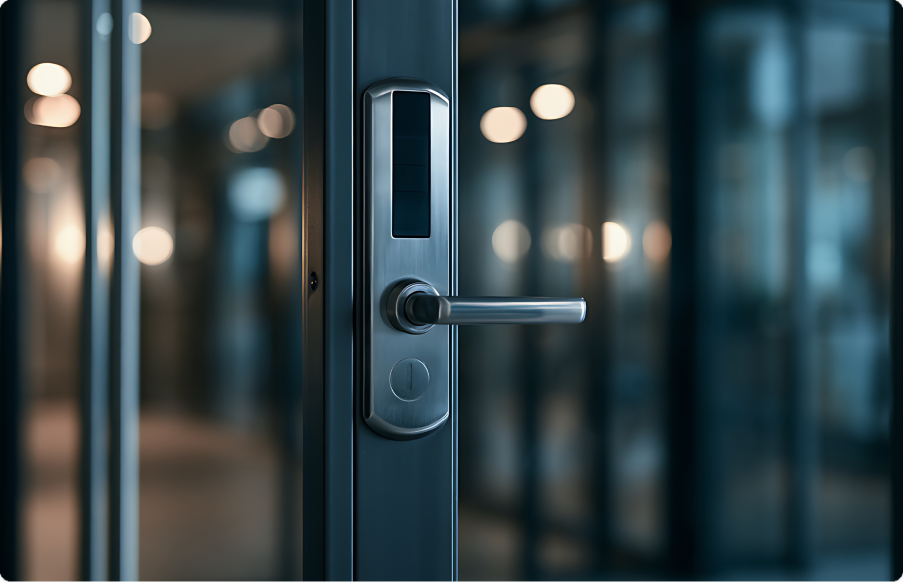
A commercial-grade door access system provides centralized credential management and access records as you add doors, locations, and users. Physical durability remains relevant, but a strong lock body alone does not make a product suitable for business use. Management software lets administrators update credentials and permissions as employees, contractors, and tenants change.
Adding users and locations increases the work required to manage access. A household may have a few permanent users, while a business may issue credentials to employees, contractors, visitors, or tenants across multiple sites. When someone leaves or changes roles, an administrator should be able to update access without visiting each door or replacing physical keys.
Commercial access systems should associate each recorded door event with a specific credential. The access platform should record which credential opened a specific door and when the event occurred. A shared keypad code cannot reliably identify one person, especially when several employees know it. Individual cards, mobile credentials, or personal identification numbers provide clearer records when the access platform assigns each credential to a named user.
A commercial door opening may use separate locking hardware, a credential reader, and a controller. A reader or keypad captures the credential, while a controller checks permission and signals the locking hardware. Management software governs users, schedules, and records across those components. Some products combine these functions in one device, while larger deployments may separate them to support existing door hardware and centralized administration.
A commercial smart lock should therefore match the operating model behind the door. Businesses with frequent turnover, multiple locations, or reporting requirements generally need centralized control and user-level records. A standalone electronic lock may still suit a low-traffic room with a small, stable user group.
What to look for in a commercial keypad, Bluetooth, or RFID lock
- Cloud management should cover every location in one console. A central console lets you add users, change permissions, and check door status without visiting each property. Look for bulk updates, location-based administrator roles, and remote device health monitoring. Automatic software and firmware updates let administrators maintain devices without updating each location manually.
- Audit trails should identify the credential and event time. A useful log records who requested access, which door they used, and whether the system granted or denied entry. Individual keypad codes provide more accountability than a shared code. Searchable records also help you investigate after-hours entry, repeated denials, and credentials used at unexpected locations.
- The platform should scale without rebuilding credential management. Ask how the system handles additional doors, properties, and users. You should be able to group people by role or location and revoke access centrally when someone leaves. Directory and visitor-management integrations can reduce manual work when access needs change frequently.
- Access methods should fit different users and entry points. Radio frequency identification (RFID) cards give employees a physical credential, while Bluetooth or mobile access can reduce card issuance. Keypads may suit temporary users, service providers, or backup access. If you plan to support multiple credential types, confirm that the system can assign them to one user record and one set of access policies.
- Door hardware must withstand its installation environment and continue operating during outages. Check weather and ingress ratings for exterior readers, along with temperature limits and expected battery life where applicable. Wired equipment should support backup power appropriate to the site. During an internet outage, locally stored credentials should still authorize approved users, and local event records should sync after connectivity returns. Ask the vendor to explain what happens when cloud connectivity, network service, or main power fails. The answer should specify which doors remain operational, how long backup power lasts, and how administrators recover the system.
Commercial systems vs. consumer smart locks
Consumer smart locks usually organize access around one lock or property, while commercial systems manage doors, users, and locations through a central console. Products from Kwikset, ULTRALOQ, and Master Lock can suit homes, rentals, or small businesses with a limited number of doors. Their features vary by model, but their management apps generally target smaller deployments rather than fleets of doors.
Credential administration creates a larger operational difference as a business grows. A consumer lock may require an administrator to remove a code, replace a key, or update access within each lock’s app. A centrally managed commercial smart lock system can revoke a departing employee’s credential remotely and apply the change across every assigned entrance. Central administration reduces repetitive work when employees change roles or leave the business.
Commercial platforms may provide searchable access records with more detail than consumer lock apps. A full audit trail can connect each door event with a credential, user, location, and time. Consumer locks may provide basic activity history, but reporting depth and retention vary by product. Searchable records support incident reviews, access investigations, and routine administration.
A consumer lock remains a practical choice when one person manages a few doors and needs simple keyless entry. A centralized commercial system fits deployments where multiple administrators manage frequent credential changes across several locations. Buyers should therefore evaluate the management platform and reporting tools alongside the physical lock.
Comparing lock types, access methods, and management systems
Door hardware controls the physical opening, while readers and keypads determine which credentials people can present. The management system governs how you issue credentials, revoke access, and review activity. Common combinations appear below, but specific capabilities vary by product and configuration.
| Lock category | Common access methods | Management model | Typical reporting |
|---|---|---|---|
| Mechanical or electronic keypad lock | Physical key, shared PIN, or individual PIN | Local key control or programming at each door | None for mechanical locks. Electronic models may store limited door-level events |
| Consumer Bluetooth smart lock | Mobile app, PIN, or physical key | App-only management, usually organized around one lock or property | Basic app history on supported models |
| Standalone radio frequency identification lock | RFID card, fob, or physical key override | Credentials programmed locally with an encoder, master card, or door-level software | Limited local records on supported models |
| Cloud-managed commercial RFID and mobile system | Smart card, mobile credential, Bluetooth, PIN, proximity credential, or biometric reader, depending on the system | Central cloud console for doors, users, schedules, and locations | Central audit trail with available user, door, event, and time data |
A keypad can reduce physical key handling, but a shared code gives you little information about who entered. Individual PINs improve attribution when the lock records activity. Local programming can still create substantial work when you manage frequent turnover across multiple sites.
Consumer Bluetooth locks may suit a residence or a small office with a few doors. Standalone RFID locks support convenient card access but often require staff to update each lock or use separate door-level tools. A cloud-managed commercial system lets you change access centrally, although buyers should confirm how quickly updates reach each door and how the system handles offline devices. You should still verify offline credential storage, backup power, reader compatibility, and audit retention for the system under consideration.
Hotel and multi-tenant deployments
A hotel door lock system must support short credential lifecycles and frequent room turnover. Front-desk staff should be able to issue a card or mobile credential at check-in, set an expiration time, and revoke access immediately when plans change. Automatic expiration deactivates a guest credential after checkout without requiring a separate revocation step.
Multi-tenant properties follow a longer credential lifecycle but manage more access combinations. Property managers may grant a tenant access to one unit and selected shared areas, while maintenance staff may receive temporary access to specific doors. A centralized management layer lets administrators update those permissions without visiting each lock.
Door-level audit records let hotel and property administrators investigate access events when the system associates each event with an individual credential. Administrators can review which credential opened a door and when, then revoke the credential without replacing a lock. A cloud-managed platform also gives regional staff one view across buildings, doors, and units instead of separate lock databases at each property.
Rhombus as a cloud-managed alternative to standalone locks
Rhombus Access Control centralizes access administration across locations in the same cloud console used for cameras and sensors. You can issue or revoke credentials remotely, review door events, and investigate related video without switching between separate systems. When internet connectivity drops, Rhombus readers can use locally stored credentials for offline operation and sync locally recorded events after the connection returns.
Users can enter with a smart card or the Rhombus mobile app. Rhombus readers that support Wave to Unlock let users present a compatible mobile credential without touching the reader. For sites that need third-party badge readers, including biometric devices, the DC20 controller supports third-party Wiegand readers as an integration path.
Pricing below reflects Rhombus’s published rates at the time of writing and is subject to change, so confirm current figures with Rhombus before budgeting. The DR20 reader is priced at $299 and supports Rhombus Badge (ISO 14443A) cards, the Rhombus mobile app, and Wave to Unlock. Its IP65 rating indicates protection against dust and water jets. Confirm that the reader’s published environmental limits and installation requirements match the site. The DR40 is priced at $1,099 for the hardware, plus a required $199 per year professional license, and adds a doorbell and video intercom. For a single door, the DC10 controller is priced at $799. For up to four doors on one controller, the DC20 is priced at $1,399 and carries a 10-year hardware warranty. Hardware pricing is separate from the per-door annual license Rhombus access control requires, so compare total platform cost, not just reader or controller price, against a consumer lock’s one-time cost.
Rhombus also works with selected third-party hardware, including ASSA ABLOY Aperio wireless locks. Aperio credentials and access events remain centrally managed through the Rhombus console, which lets compatible openings use wireless locks instead of a wired connection to each lock. Review Rhombus Access Control and Rhombus integrations for more deployment details.
FAQs
What qualifies as a commercial smart lock?
A commercial smart lock is designed for business use and supports administrator-controlled credentials, access permissions, and event records. Centrally managed models can apply those controls across multiple doors or locations. Depending on the product and installation, commercial systems may provide remote administration, locally stored credentials for internet outages, backup power compatibility, and integrations with other security tools.
How do RFID, Bluetooth, and keypad access differ?
Radio frequency identification (RFID) systems read a card or fob, while Bluetooth systems use a nearby mobile device as the credential. Keypads accept a personal identification number without requiring a card or phone. RFID and Bluetooth credentials can identify individual users, while shared keypad codes provide less accountability unless the lock supports unique codes.
Can a commercial access control system work with existing door hardware?
Some commercial systems can reuse compatible electric strikes, magnetic locks, request-to-exit devices, and door sensors. The door assembly, wiring, power requirements, controller, and applicable fire and building rules determine compatibility. For example, the Rhombus DC10 and DC20 controllers can pair with existing door hardware, but a qualified installer should confirm each opening before purchase.
How does hotel or multi-tenant credential management differ from access control for a single office?
Hotels and multi-tenant properties issue and revoke credentials more frequently because guests, residents, contractors, and service workers need different access periods. Their management software must assign access by room, unit, shared area, and expiration time across many doors. A single-site office usually manages a more stable employee population and fewer permission changes.
Choosing the right system for your business
For a multi-location deployment, evaluate the management platform before selecting compatible locks and readers. For a multi-location business, the platform determines whether you can issue and revoke credentials remotely, investigate access events, and manage every site without visiting each door. Confirm that it supports your preferred access methods, existing door hardware, and offline operation.
Rhombus brings cloud-managed access control, video, and sensors into one console. You can manage locations centrally and review door events with related footage. If you want to assess the platform for your locations, request a Rhombus demo.
%20--%3e%3csvg%20version='1.1'%20id='Layer_1'%20xmlns='http://www.w3.org/2000/svg'%20xmlns:xlink='http://www.w3.org/1999/xlink'%20x='0px'%20y='0px'%20viewBox='0%200%20110%20110'%20style='enable-background:new%200%200%20110%20110;'%20xml:space='preserve'%3e%3cstyle%20type='text/css'%3e%20.st0{fill:url(%23SVGID_1_);}%20%3c/style%3e%3cg%3e%3clinearGradient%20id='SVGID_1_'%20gradientUnits='userSpaceOnUse'%20x1='25.325'%20y1='766.725'%20x2='84.725'%20y2='707.325'%20gradientTransform='matrix(1%200%200%201%200%20-682)'%3e%3cstop%20offset='0'%20style='stop-color:%23006F94'/%3e%3cstop%20offset='1'%20style='stop-color:%2300C1DE'/%3e%3c/linearGradient%3e%3cpath%20class='st0'%20d='M106.9,47.5L62.5,3.1c-4.1-4.1-10.9-4.1-15,0L3.1,47.5c-4.1,4.1-4.1,10.9,0,15l44.4,44.4%20c4.2,4.2,10.9,4.2,15.1,0L107,62.5C111,58.4,111,51.6,106.9,47.5z%20M55.5,71.2c-9.4,0.3-17-7.3-16.7-16.7C39.1,46,46,39.1,54.5,38.8%20c9.3-0.3,17,7.3,16.7,16.7C70.9,64,64,70.9,55.5,71.2z'/%3e%3c/g%3e%3c/svg%3e)
Related Articles