Back to blog home
RFID, Key Fobs & Smart Locks: Access Control Credentials Guide
by Team Rhombus, on August 12th, 2026
Physical SecurityQuick Summary
- Commercial access systems can use RFID cards, key fobs, proximity badges, PINs, mobile devices, smart cards, and biometric credentials.
- Proximity cards and fobs cost less and work without phone batteries, but attackers can clone older unencrypted formats. Mobile and smart credentials offer stronger protections but may require reader upgrades or software fees.
- Main entrances usually favor fast, convenient credentials. High-security rooms benefit from smart cards, biometrics, or multiple factors. If you manage multiple sites, choose credentials that administrators can issue and revoke remotely.
- A unified access control platform can support several credential types at once. You can then give each door a credential suited to its traffic and risk.
What Is an Access Control Credential?
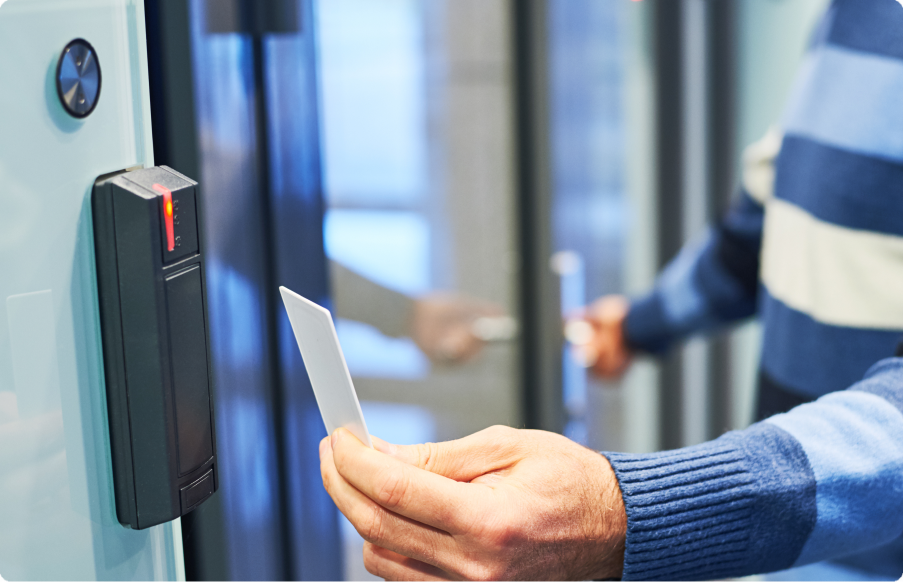
An access control credential provides evidence that a person may enter a secured area. A credential can be a physical item such as an RFID card or key fob, a digital credential stored on a phone, a personal identification number (PIN), or a biometric trait such as a fingerprint.
Credentials generally fall into three authentication factor categories: possession, knowledge, and inherence. Cards, key fobs, and phones are possession factors because the user carries them. Cards, fobs, and phones may communicate with a reader through RFID, Bluetooth, or near-field communication. Biometrics provide an inherence factor by comparing a physical characteristic with an enrolled template. PINs provide a knowledge factor and often supplement a possession or inherence factor.
Each access attempt follows the same basic path. A compatible reader or keypad captures identifying information from the credential and passes it to a door controller, which checks the person’s permissions and instructs the lock to open or remain secured. Credential security therefore depends on the credential format and the protections used by readers and controllers. A cloud-managed access control platform can support several credential formats at once, so the choice of card, fob, or biometric reader does not lock you into a single vendor’s ecosystem.
RFID Frequencies and Security
Radio frequency identification, or RFID, credentials send a stored identifier to a compatible reader over radio waves. The access controller checks that identifier against the permissions associated with it and decides whether to unlock the door. A key fob uses the same RFID mechanism as a card. Its smaller casing simply fits on a key ring.
Many older low-frequency credentials provide weak protection because they transmit a static, unencrypted identifier. These low-frequency (LF) cards and fobs require the user to hold the credential within a few inches of the reader. An inexpensive scanner can capture that identifier and copy it onto another credential because the reader cannot confirm whether the original card produced the signal. LF credentials may remain suitable for low-risk legacy doors, but they provide a weak baseline for new installations.
High-frequency (HF) smart cards commonly operate at 13.56 MHz and can support encrypted authentication. Secure formats use a challenge-and-response exchange in which the card and reader verify each other without transmitting the stored encryption key. Capturing one exchange therefore does not provide enough information to create a working copy. You should verify the specific card format and security configuration because the HF frequency alone does not guarantee encryption.
Ultra-high-frequency credentials provide long-range access at 860 to 960 MHz. Depending on tag type, reader power, and local RF regulations, their read distance can exceed 10 meters, which suits vehicle gates and hands-free entrances at logistics sites. Country-specific radio rules and the risk of unintended reads require careful reader placement and configuration.
For most new commercial door deployments, encrypted HF smart cards or fobs provide a stronger security baseline than unencrypted LF proximity credentials. Multi-technology readers can support both frequencies during a phased replacement. You can then retire older credentials without changing every cardholder at once.
Badge Formats and Reader Security
Badge security depends on the credential format, not the badge shape. HID Prox credentials operate at 125 kHz and transmit an identifier without encryption, which makes them compatible with older readers but easier to clone. Original iCLASS and MIFARE Classic improved on basic proximity cards, but their encryption no longer provides reliable protection against cloning.
Newer smart-card formats use stronger authentication and encryption. HID Seos and MIFARE DESFire EV1 or later, implemented correctly, provide better protection against credential copying than legacy formats, and EV2 and newer add further hardening that some practitioners prefer as the baseline for new deployments. Multi-technology cards can carry both old and new formats, which lets you replace readers gradually without issuing separate badges during the migration.
Reader wiring can weaken an otherwise secure credential. Legacy Wiegand connections usually send credential data between the reader and the controller without encryption. The Open Supervised Device Protocol, or OSDP, can encrypt that connection and monitor reader status through two-way communication. When sourcing a badge system, ask vendors which credential format protects the card-to-reader exchange and which protocol protects the reader-to-controller connection.
PIN Keypads
Shared PINs provide weak identity evidence because anyone who knows a code can copy or share it. Keypads therefore fit better as backup credentials or controls for low-risk spaces such as shared restrooms and storage rooms. Higher-security doors should pair a PIN with a card, fob, mobile credential, or biometric check.
Standalone keypads control one door and store codes locally. They cost less to deploy than a centralized access control system but require updates at the door. Their event records may also be limited or unavailable.
Networked keypads connect to a central access control platform. You can assign unique PINs and revoke them remotely. The platform can then associate each entry event with a user. Unique codes improve accountability, but users can still disclose them. A networked keypad provides stronger protection when it requires both a PIN and a separate credential.
Mobile Credentials
Mobile credentials turn a smartphone into a digital key that a compatible reader can verify. An administrator assigns the credential through an access control platform, and the user presents the phone near the reader or sends an unlock command through an app.
Near Field Communication, or NFC, supports deliberate tap-to-unlock access because the phone must be held within a few centimeters of the reader. Bluetooth Low Energy, or BLE, works at a longer range and can support wave-to-unlock or hands-free entry. BLE performance depends on app permissions, wireless connections, reader settings, and the surrounding environment.
Remote credential management separates mobile access from physical cards and fobs. You can issue access without handing over a token, then revoke it without recovering one. Central administration can reduce card replacement work for temporary staff and contractors, especially those who move between locations.
Mobile access requires a fallback for users who cannot use a phone. A dead battery, incompatible device, disabled wireless setting, or restricted app permission can prevent entry. Use a physical credential or keypad as that fallback. Before choosing NFC or BLE, confirm which phones the system supports and test the intended interaction at each door. NFC suits controlled tap access, while BLE suits entrances where longer reading distance or touchless use improves traffic flow.
Biometric Credentials
Biometric credentials verify a physical trait rather than a card, phone, or code. Because the user must present the enrolled trait, biometrics can provide stronger identity assurance than a shared PIN or transferable card. Biometric methods vary in accuracy, resistance to copied samples, and performance under different reading conditions.
Fingerprint readers fit controlled areas such as offices and server rooms that need moderate to high security. They compare ridge patterns, but dirt, gloves, injuries, and shared-reader hygiene can affect use. Fingerprint authentication often works better as one factor alongside a card or mobile credential for sensitive rooms.
Face matching supports fast, contactless entry at busy doors. Lighting, camera angle, masks, and image quality can affect matching, while liveness detection helps reject printed photos or recorded video. Despite these variables, face matching can be practical for staffed entrances and high-throughput locations, provided the installation and risk level suit the technology.
Iris and retina scanners suit restricted locations such as laboratories and critical infrastructure when a low false-acceptance rate matters more than speed or convenience. The required alignment and specialized sensors slow throughput, making these methods better suited to low-volume checkpoints. Vein readers use infrared light to map internal patterns in a finger or palm. Their internal target makes copied samples harder to use, which supports high-security applications and users with damaged fingerprints.
Biometric records may qualify as personally identifiable or protected information under the General Data Protection Regulation, California Consumer Privacy Act, or Illinois Biometric Information Privacy Act, depending on the deployment. The Health Insurance Portability and Accountability Act can also apply, but generally only when a healthcare-covered entity links biometric records to protected health information rather than to a standalone door credential. You should obtain any required consent and restrict access to biometric records. Encrypt stored data and set retention rules. Some systems store mathematical templates instead of raw images, but template storage does not remove privacy or security obligations.
How to Choose Credentials by Risk and Use Case
Your credential policy should match each door’s risk level and traffic volume. RFID cards and key fobs keep issuance costs low and work without phone batteries, but lost tokens require replacement and older proximity formats may be cloned. Mobile credentials support remote issuance and revocation, though access depends on compatible, charged devices. Biometric credentials provide stronger identity verification but require more expensive readers and careful handling of biometric data.
A mixed-credential access control system lets you apply different methods without requiring a single method across the building. Administrators can change one door’s authentication rule without forcing every user and reader onto the same workflow.
Multi-factor authentication works because each factor proves something different. A card shows possession, while a PIN shows knowledge. A biometric check connects access to the enrolled person. A copied card cannot open the door without the second factor.
Before procurement, verify that each reader and management platform supports the required credential formats, authentication rules, and fallback methods. Mixed support also provides fallback access when a card or phone is unavailable or when a biometric reader does not work for someone.
Matching Credentials to Entry Points
Main entrances should favor fast, familiar credentials that keep people moving. Encrypted smart cards and mobile credentials can provide contactless entry with little user training, while legacy proximity badges are better reserved for low-risk doors or phased migrations. Visitor badges or temporary mobile credentials give guests limited access without placing them in the regular employee credential pool.
High-security rooms should require multi-factor authentication when the risk supports the added time and cost. A biometric reader paired with a smart card or mobile credential verifies both an enrolled physical trait and a credential the person possesses. That extra step may be justified in server rooms, laboratories, and areas containing sensitive records. You should also provide an approved fallback for reader failures and account for privacy requirements before collecting biometric data.
If you manage multiple sites, prioritize centralized, cloud-based credential management. You can issue or revoke mobile access remotely, while shared policies keep door permissions consistent across locations. A platform that connects access control to cameras and sensors through existing integrations also lets administrators correlate a badge swipe or biometric scan with video from the same door. Physical badges and fobs can remain available for employees without compatible phones or for sites where device use is impractical.
Use these requirements as a procurement checklist: confirm credential compatibility, per-door authentication rules, centralized administration, offline behavior, and fallback access.
How Rhombus Supports Multiple Credential Types
At Rhombus, we manage multiple credential methods through one cloud console, so you can assign the appropriate access method to each door and location. Our access control platform supports mobile app credentials, touchless Wave to Unlock, proximity readers, biometric readers, and smart cards.
Centralized management gives you one place to issue and revoke credentials and set schedules. You can also review access events and manage permissions across sites. Locally stored credentials support offline operation, and recorded events sync with the cloud after connectivity returns.
With Rhombus, you can keep existing compatible locks and readers or choose preferred models, reducing unnecessary hardware replacement. Our supported security integrations connect access control with other systems, including cameras, sensors, visitor workflows, and identity services.
Explore Rhombus access control to learn how different credential options could work with your doors and existing hardware. Request a demo to walk through credential options for your specific doors and hardware with the Rhombus team.
Frequently Asked Questions
What is the difference between RFID and a key fob?
Radio frequency identification, or RFID, describes the technology that sends credential data to a reader, while a key fob describes the credential’s physical shape. With Rhombus, you can use compatible RFID credentials in card or fob form. You can choose the format people find easier to carry without changing the underlying access method.
Is biometric access control legal and compliant?
Biometric access control verifies identity by comparing an enrolled physical trait, and its use is subject to privacy, consent, retention, and security laws that vary by location. For a Rhombus deployment, confirm current product controls and review applicable requirements with qualified counsel before installation. That review helps you protect biometric templates and document compliant collection, use, retention, and deletion.
Which credential type provides the strongest security?
Encrypted smart cards and credentials tied to a phone or biometric trait generally resist copying better than legacy proximity cards or shared PINs. With Rhombus, you can pair compatible credential types when one factor does not provide enough protection. Requiring two factors, such as a card and a biometric credential, reduces the risk created by a stolen or shared credential.
Can one access control system support multiple credential types?
A multi-credential access control system lets different doors or users authenticate with cards, fobs, phones, PINs, or biometrics. Confirm current Rhombus reader compatibility and credential support for the hardware you plan to use. Mixed credential support lets you prioritize convenience at main entrances and stronger verification in restricted rooms.
The Takeaway
Choose credentials door by door. A busy main entrance may favor fast, touchless access, while a server room may require stronger identity verification or multiple factors.
Select a platform that can apply different credentials, authentication factors, and fallback methods at each door as risks and traffic patterns change. Request a demo to evaluate compatible credential options for your locations and existing hardware.
%20--%3e%3csvg%20version='1.1'%20id='Layer_1'%20xmlns='http://www.w3.org/2000/svg'%20xmlns:xlink='http://www.w3.org/1999/xlink'%20x='0px'%20y='0px'%20viewBox='0%200%20110%20110'%20style='enable-background:new%200%200%20110%20110;'%20xml:space='preserve'%3e%3cstyle%20type='text/css'%3e%20.st0{fill:url(%23SVGID_1_);}%20%3c/style%3e%3cg%3e%3clinearGradient%20id='SVGID_1_'%20gradientUnits='userSpaceOnUse'%20x1='25.325'%20y1='766.725'%20x2='84.725'%20y2='707.325'%20gradientTransform='matrix(1%200%200%201%200%20-682)'%3e%3cstop%20offset='0'%20style='stop-color:%23006F94'/%3e%3cstop%20offset='1'%20style='stop-color:%2300C1DE'/%3e%3c/linearGradient%3e%3cpath%20class='st0'%20d='M106.9,47.5L62.5,3.1c-4.1-4.1-10.9-4.1-15,0L3.1,47.5c-4.1,4.1-4.1,10.9,0,15l44.4,44.4%20c4.2,4.2,10.9,4.2,15.1,0L107,62.5C111,58.4,111,51.6,106.9,47.5z%20M55.5,71.2c-9.4,0.3-17-7.3-16.7-16.7C39.1,46,46,39.1,54.5,38.8%20c9.3-0.3,17,7.3,16.7,16.7C70.9,64,64,70.9,55.5,71.2z'/%3e%3c/g%3e%3c/svg%3e)
Related Articles