Back to blog home
Can Rhombus Work With Your Existing Cameras? A Guide to Third-Party Camera Integration
by Team Rhombus, on May 12th, 2026
Physical SecurityCan Rhombus Work With Your Existing Cameras? A Guide to Third-Party Camera Integration
Every camera evaluation hits the same wall: you’ve got 30 cameras already in the ceiling, and nobody wants to budget for ripping them out. Rhombus Relay gives you two paths for bringing third-party cameras into the Rhombus cloud platform. The right one depends on what you already have deployed and how many cameras you need to integrate.
Compatibility claims only go so far without specifics. This guide breaks down how Relay works, what’s actually compatible, and where the limitations are.
What “Camera-Agnostic” Actually Means
Most vendors say “camera-agnostic.” What they mean is: we support two protocols, RTSP and ONVIF, and your mileage will vary.
RTSP (Real Time Streaming Protocol) is the standard method IP cameras use to deliver video streams over a network. If your camera can output an RTSP stream, it can technically feed video to another system. ONVIF is an interoperability standard that lets cameras and management platforms discover and communicate with each other automatically, without manual configuration for each device.
Most commercial IP cameras manufactured in the last decade support one or both. ONVIF-compliant cameras can be auto-discovered on your network. Cameras that only support RTSP require you to manually enter a stream URL. That distinction matters during setup.
How Rhombus Relay Works
Relay is the bridge layer between your existing cameras and the Rhombus cloud console. It ingests RTSP streams from third-party hardware, encrypts the video once it reaches the Rhombus device, and pushes everything into the same management interface you’d use with native Rhombus cameras. Two versions exist for different scenarios.
Relay Core (N100)
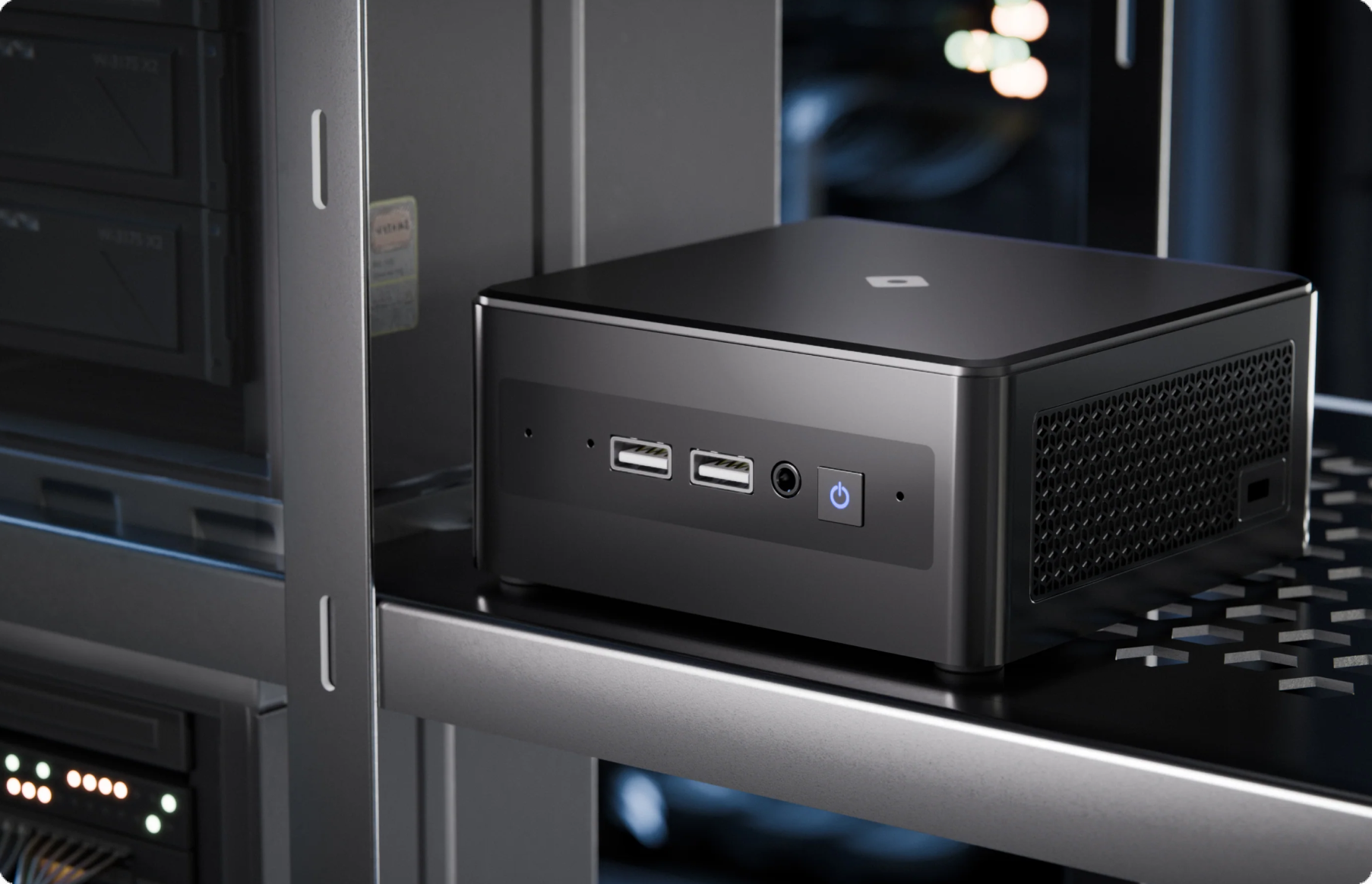
Relay Core N100 is a physical mini-PC that sits on your network and connects up to 10 third-party cameras per device. It works with any camera that outputs RTSP, uses ONVIF when the camera supports it, and falls back to manual RTSP URL entry for everything else.
Key specs:
- Camera capacity: 10 third-party cameras per device
- Storage: 2TB onboard SSD, up to 20 days per camera (varies by resolution, bitrate, and motion levels)
- Networking: Two ethernet ports, one for internet connectivity and one for a closed internal camera network
- Encoding: H.264 recommended (cameras using other codecs may need reconfiguration)
- Auto-discovery: Cameras on standard RTSP port 554 or ONVIF-compliant devices are discovered automatically
- Compliance: NDAA and TAA compliant, with CE/FCC/IC/UK/AUS/NZ certifications
- Warranty: 5 years on the N100 hardware
- Form factor: 117mm x 112mm x 54mm, compact enough to mount in a telecom closet or behind a monitor
No NVR is required. If you already have one, you can keep it running for additional on-premise storage, but Relay Core handles cloud connectivity and local caching independently.
Relay Lite
Relay Lite takes a different approach: no additional hardware at all. If you already have at least one Rhombus camera deployed at a site, that camera can act as a bridge for one third-party camera on the same network.
The ratio is 1:1. One Rhombus camera integrates one third-party camera. Relay Lite auto-discovers compatible cameras in seconds and is available at no additional cost. For organizations running a mixed environment where a few legacy cameras remain alongside a Rhombus deployment, Relay Lite keeps those stragglers visible in the same console without adding another box to the network.
What Cameras Are Compatible With Rhombus Relay
If your camera streams RTSP, it can connect. That’s the bar. ONVIF-compliant cameras get the smoothest experience because Relay auto-discovers them on the network without manual configuration.
For cameras that aren’t ONVIF-compliant and don’t listen on standard port 554, you’ll need the RTSP URL from the manufacturer’s documentation. Some camera brands have non-standard RTSP URL parameters, so expect to reference your camera vendor’s support pages during setup. H.264 is the recommended encoding format; cameras running H.265 or MJPEG may need their stream settings adjusted before Relay can ingest them reliably.
What You Get Once Connected to Rhombus
Once a third-party camera is connected through Relay, it appears in the Rhombus Console alongside native Rhombus cameras. Remote access, real-time alerts, and cloud-managed video all run from a single interface regardless of the camera manufacturer.
AI analytics are available through Relay Core, including license plate recognition, facial recognition, color search, and visitor counting. These features require a Professional license for standard analytics or an Enterprise license for advanced capabilities. Cloud Archiving is also available for extended retention beyond what the local SSD provides.
One caveat on analytics worth spelling out: the accuracy of AI detections depends heavily on the image quality your third-party cameras actually deliver. A 10-year-old 720p camera pointed at a parking lot will not produce the same LPR results as a modern 4K sensor. Rhombus provides the processing. Your cameras provide the pixels.
What to plan for
Firmware Management Is on You
Rhombus manages firmware updates automatically for its own cameras. For third-party cameras connected through Relay, that responsibility stays with your team.
If you’re integrating 5 cameras from one manufacturer, the firmware burden is manageable. Forty cameras across four brands? You’re maintaining four separate firmware update workflows alongside the Rhombus console. For IT teams already stretched thin, that labor cost adds up fast.
AI Analytics Performance Varies
Rhombus runs the same AI models on third-party camera feeds that it runs on native hardware. But AI analytics are only as good as the input. Third-party cameras with low resolution, poor low-light performance, or aggressive compression will produce less reliable detections.
If high-accuracy facial recognition or LPR is a core requirement, test your existing cameras against those use cases before assuming they’ll match a Rhombus sensor designed for that workload. Rhombus does the processing well. The variable is your legacy hardware.
Relay Lite Requires a Rhombus Camera On-Site
Relay Lite is free and requires no additional hardware, but it only works if you already have at least one Rhombus camera deployed at the location. For organizations evaluating Rhombus for the first time with zero Rhombus hardware installed, Relay Core N100 is the path.
Relay vs. Native Rhombus Cameras: When to Use Each
Use Relay when:
- You have functional cameras with remaining useful life and don’t want to absorb a full replacement cost right now
- You’re in a phased migration where some sites get new Rhombus cameras while others keep legacy hardware temporarily
- Budget constraints make a full hardware refresh impractical this fiscal year
Use native Rhombus cameras when:
- You want managed firmware updates, optimized AI analytics, and the full 10-year camera warranty
- You’re deploying at a new site with no existing infrastructure
- Consistent image quality across all cameras is a hard requirement
Many deployments will be hybrid: native Rhombus cameras at high-priority locations, Relay-connected legacy cameras at secondary sites, with a gradual migration plan over two to three budget cycles.
Comparison: Relay Lite vs. Relay Core vs. Native Rhombus Cameras
| Relay Lite | Relay Core (N100) | Native Rhombus Cameras | |
|---|---|---|---|
| Hardware required | None (uses existing Rhombus camera) | N100 mini-PC | Rhombus camera unit |
| Camera requirement | At least one Rhombus camera on-site | None | None |
| Cameras supported | 1 third-party camera per Rhombus camera | Up to 10 third-party cameras per device | N/A |
| Cost | No additional cost | N100 hardware purchase + license | Camera purchase + license |
| Firmware management | Manual (your team) | Manual (your team) | Automatic (Rhombus-managed) |
| AI analytics | Limited | Full analytics with Professional or Enterprise license | Full analytics with Professional or Enterprise license |
| Best for | Small mixed deployments with a few legacy cameras | Sites with 1-10 third-party cameras and no Rhombus hardware | New deployments, high-priority sites, full-feature requirements |
What’s Coming: Relay Core N500
Rhombus has announced the Relay Core N500 for organizations operating at larger scale. The N500 moves to a rack-mount form factor and supports up to 50 cameras per device, compared to the N100’s 10-camera limit. For campuses, multi-building facilities, or enterprise deployments with extensive legacy camera fleets, the N500 reduces the number of Relay devices you need to manage. Availability details have not been finalized yet.
Frequently Asked Questions
Does Relay Core replace my NVR?
Relay Core handles local storage (2TB SSD, up to 20 days per camera) and cloud connectivity independently. An NVR is not required. If you want to keep an existing NVR running for additional on-premise storage or redundancy, it can coexist with Relay Core on the same network.
Is Relay Core NDAA compliant?
Yes. The N100 is both NDAA and TAA compliant, with additional certifications for CE, FCC, IC, UK, Australia, and New Zealand. For government and regulated facilities, Relay Core meets the same compliance standards as native Rhombus hardware.
How long does setup take?
ONVIF-compliant cameras and cameras listening on standard RTSP port 554 are auto-discovered in seconds. Cameras that require manual RTSP URL entry take longer depending on how quickly you can locate the correct stream URL from the manufacturer’s documentation.
Does Relay work with any camera brand?
Relay works with any camera that supports RTSP streaming, regardless of manufacturer. ONVIF-compliant cameras auto-discover fastest. Cameras without ONVIF support can be added manually via their RTSP URL. H.264 encoding is recommended for the best compatibility.
What licenses do I need for third-party camera integration?
A Rhombus Professional license covers standard analytics for cameras connected through Relay. Enterprise licenses unlock advanced analytics features like facial recognition and detailed visitor counting. Cloud Archiving is available as a separate add-on for extended video retention beyond the N100’s local storage.
Ready to See It in Action?
If you have existing cameras and want to see how they’d work inside the Rhombus Console, a live demo is the most efficient way to get specific answers. Rhombus can walk you through Relay Core and Relay Lite using your deployment as the reference point.
%20--%3e%3csvg%20version='1.1'%20id='Layer_1'%20xmlns='http://www.w3.org/2000/svg'%20xmlns:xlink='http://www.w3.org/1999/xlink'%20x='0px'%20y='0px'%20viewBox='0%200%20110%20110'%20style='enable-background:new%200%200%20110%20110;'%20xml:space='preserve'%3e%3cstyle%20type='text/css'%3e%20.st0{fill:url(%23SVGID_1_);}%20%3c/style%3e%3cg%3e%3clinearGradient%20id='SVGID_1_'%20gradientUnits='userSpaceOnUse'%20x1='25.325'%20y1='766.725'%20x2='84.725'%20y2='707.325'%20gradientTransform='matrix(1%200%200%201%200%20-682)'%3e%3cstop%20offset='0'%20style='stop-color:%23006F94'/%3e%3cstop%20offset='1'%20style='stop-color:%2300C1DE'/%3e%3c/linearGradient%3e%3cpath%20class='st0'%20d='M106.9,47.5L62.5,3.1c-4.1-4.1-10.9-4.1-15,0L3.1,47.5c-4.1,4.1-4.1,10.9,0,15l44.4,44.4%20c4.2,4.2,10.9,4.2,15.1,0L107,62.5C111,58.4,111,51.6,106.9,47.5z%20M55.5,71.2c-9.4,0.3-17-7.3-16.7-16.7C39.1,46,46,39.1,54.5,38.8%20c9.3-0.3,17,7.3,16.7,16.7C70.9,64,64,70.9,55.5,71.2z'/%3e%3c/g%3e%3c/svg%3e)
Related Articles