Back to blog home

Introducing New Partner Tools in the Rhombus MCP Server
by Scott Wisotsky, on November 17th, 2026
Product UpdatesRhombus channel partners can now price, quote, create, and manage deals from the AI tools that they already use like Claude and ChatGPT with the new Rhombus MCP (Model Context Protocol) server 1.0.4. The new updated Rhombus MCP server adds a set of partner tools, so the answers and actions that used to take a login to the partner portal now take one simple question in Claude, Gemini, ChatGPT or other AI tools.
Rhombus initially launched an MCP server in 2025, giving customers a way to work with their cameras, doors, and alerts in plain language within their preferred AI tool. This new release extends the Rhombus MCP capabilities to the partners who sell and support Rhombus.
Partners can sign in with a Rhombus partner account, and the partner tools will appear alongside everything else.
What partners can do
Price and quote
Partners can browse the Rhombus price book and create/ edit quotes on registered deals. Rhombus prices each quote as you go, so the numbers you share with a customer are the real ones.
Place the order
When the customer is ready, attach the purchase order to the opportunity to finalize the order, without needing to log in to the partner portal.
Self-provision licenses
Approved MSPs can order licenses into their license pool on demand. Simple pick the SKU and quantity, review the quote, and accept. Licenses arrive by claim key, ready to assign to clients.
Run your Rhombus business
Track deals and leads, request and claim MDF, review your partner metrics, and find marketing assets and news. Everything you would check in the partner portal is now a question away in your favorite AI tool.
Just ask
There are no commands to learn. Sign into your preferred AI tool like Claude or ChatGPT with your Rhombus partner account and ask in plain language:
- “What does the 3-year cloud license cost for this camera?”
- “Show my open deals and draft a quote for each.”
- “Order 25 licenses into our pool.” (MSPs)
Built-in safeguards
Quoting and ordering through an AI assistant only works if you can trust it. Rhombus has built in safeguards such as:
- Nothing is ordered by accident. Every order needs an explicit confirmation. License orders are signed with the user’s own typed name, and a receipt is emailed.
- Access stays in your control. AI access is enabled per partner account, and every request acts as your own partner organization.
- Customer data stays protected. AI answers leave out end-customer contact details, and prices always come from Rhombus quoting, never estimated by the AI.
Not just for partners
Rhombus customers can use the same MCP server to work within their own organization and within the permissions of their role. Partner tools load only for partner sign-ins and customers see only the console tools. End user customers can:
- Pull clips and review alerts
- Lock, unlock, and monitor doors
- Manage access control systems, credentials, and users
- Manage video wall configurations for multi-camera monitoring
- Check camera uptime and connectivity history
- Run license plate and facial recognition searches and more
A new home for Rhombus Developers
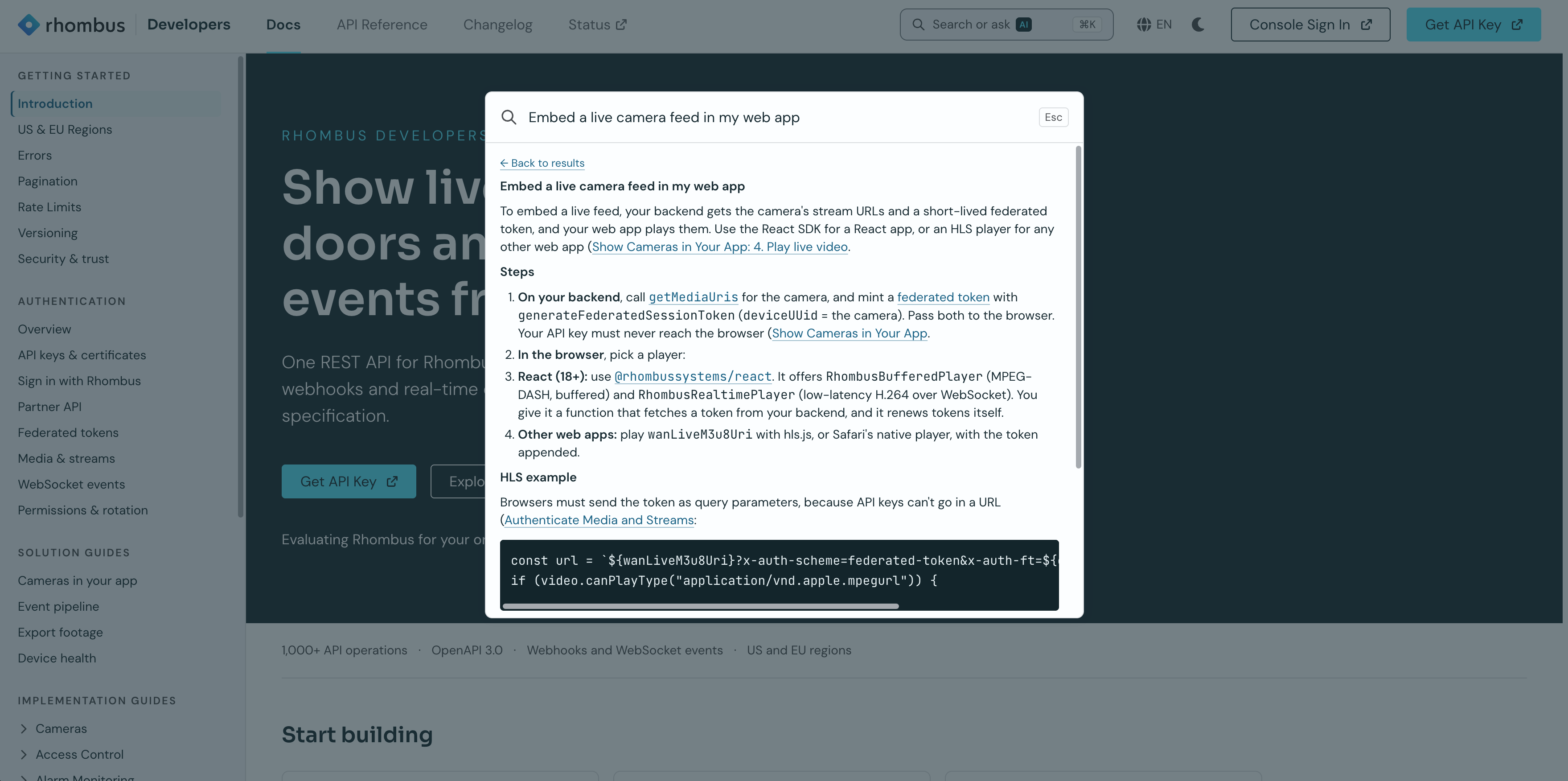
The partner MCP update arrives alongside a refreshed Rhombus Developers site. You can now ask a question right on the page and get an answer drawn from the documentation, instead of searching through it page by page.
Get started
Rhombus MCP server 1.0.4 is available now. Set it up in your preferred platform, such as Claude or ChatGPT, with the setup instructions on Rhombus Developers. Quoting, deal reg, license self-provisioning, and MDF access are enabled per partner account.
%20--%3e%3csvg%20version='1.1'%20id='Layer_1'%20xmlns='http://www.w3.org/2000/svg'%20xmlns:xlink='http://www.w3.org/1999/xlink'%20x='0px'%20y='0px'%20viewBox='0%200%20110%20110'%20style='enable-background:new%200%200%20110%20110;'%20xml:space='preserve'%3e%3cstyle%20type='text/css'%3e%20.st0{fill:url(%23SVGID_1_);}%20%3c/style%3e%3cg%3e%3clinearGradient%20id='SVGID_1_'%20gradientUnits='userSpaceOnUse'%20x1='25.325'%20y1='766.725'%20x2='84.725'%20y2='707.325'%20gradientTransform='matrix(1%200%200%201%200%20-682)'%3e%3cstop%20offset='0'%20style='stop-color:%23006F94'/%3e%3cstop%20offset='1'%20style='stop-color:%2300C1DE'/%3e%3c/linearGradient%3e%3cpath%20class='st0'%20d='M106.9,47.5L62.5,3.1c-4.1-4.1-10.9-4.1-15,0L3.1,47.5c-4.1,4.1-4.1,10.9,0,15l44.4,44.4%20c4.2,4.2,10.9,4.2,15.1,0L107,62.5C111,58.4,111,51.6,106.9,47.5z%20M55.5,71.2c-9.4,0.3-17-7.3-16.7-16.7C39.1,46,46,39.1,54.5,38.8%20c9.3-0.3,17,7.3,16.7,16.7C70.9,64,64,70.9,55.5,71.2z'/%3e%3c/g%3e%3c/svg%3e)
Related Articles